IGNOU Writer • 2026
Download IGNOU Assignment Front Page PDF 2026 (Free Cover Page Format)
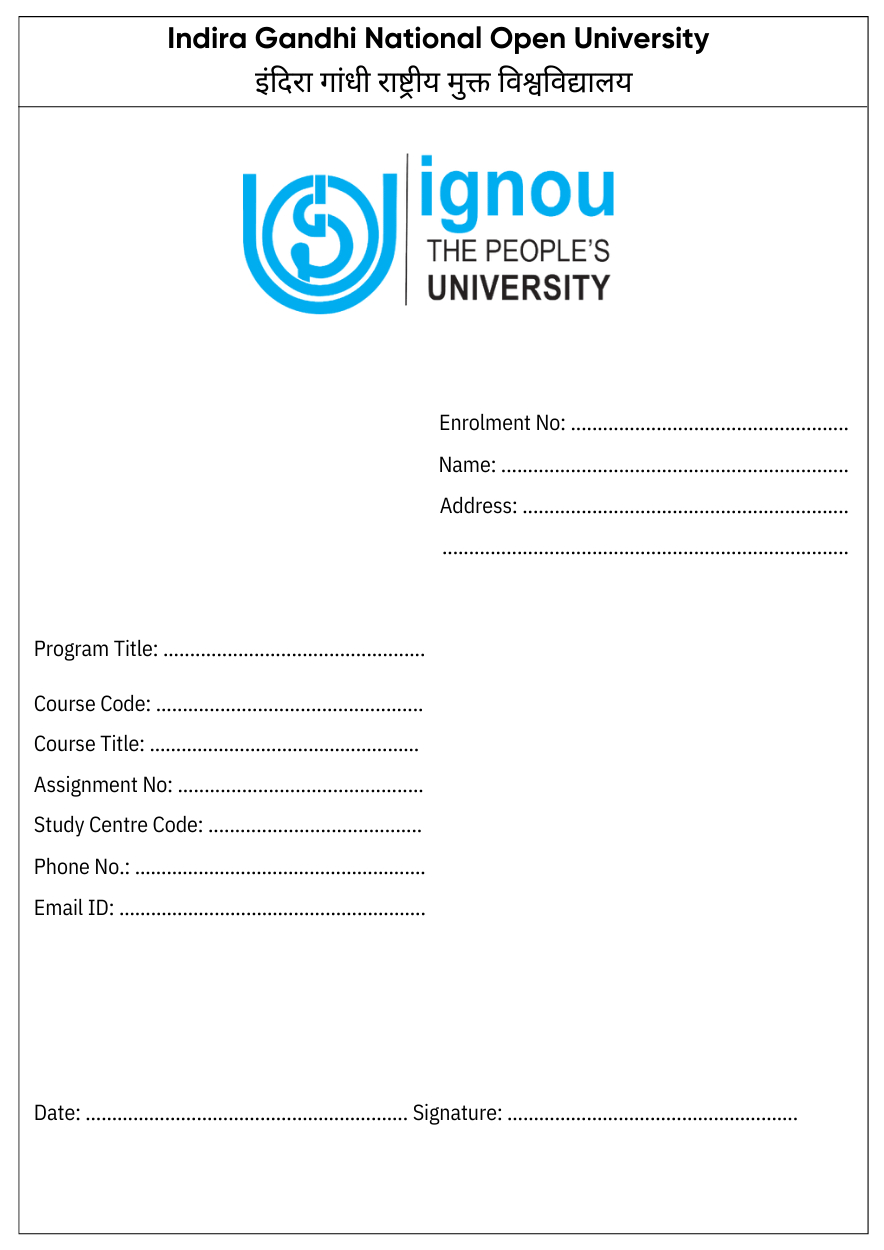
Download the IGNOU Assignment Front Page PDF 2026 in printable A4 format for assignment submission. Choose from multiple cover page designs, preview the format before downloading, and print a separate front page for each course or subject.
These cover page templates include space for enrollment number, programme code, course code, assignment code, study centre details, signature, and date. Download your preferred format below and use the filling guide to avoid common submission mistakes.
Download IGNOU Assignment Front Page PDF 2026
Start here if you only came to download the front page. The gallery includes four commonly used printable formats: standard, modern clean, minimal handwritten, and signature-ready.
Preview each template before downloading so you can choose a layout that is easy to print, easy to fill, and easy for the evaluator to read. Clear spacing matters because your enrollment number, programme code, course code, and assignment code should be visible without confusion.
If you are preparing the full assignment along with the cover page, you can use IGNOU Writer assignment support and get the handwritten copy arranged professionally. For answer length and sample structure, also check the IGNOU assignment word limit and format guide before writing.
Each downloaded JPG can be printed on A4 paper and used as the IGNOU assignment first page. Attach it on top of the handwritten answer sheets for that course, then keep the pages together as one assignment bundle.
Use a separate front page for every course because IGNOU assignments are checked and recorded subject-wise. Fill the details manually with a blue or black pen, and avoid overwriting so the study centre can verify the page quickly.
After selecting a format, quickly confirm the session, paper size, and required details below before printing multiple copies.
Standard Front Page PDF
IGNOU Assignment Front Page Quick Details
Before you print the IGNOU assignment cover page PDF, confirm the basic details once: session, format, paper size, filling mode, and the fields you must complete. This saves time because you will not need to reprint the page after noticing a missing field.
The quick details below also help you prepare the right information before writing. Keep your ID card, assignment question paper, and study centre details nearby so the cover page can be filled correctly in one attempt.
- Resource Name: IGNOU Assignment Front Page / Cover Page
- Session: 2026
- Format: JPG / Printable A4 Format
- Use For: IGNOU Assignment Submission
- Required For: Every Subject / Course
- Filling Mode: Handwritten Details Recommended
- Paper Size: A4
- Main Details: Enrollment Number, Programme Code, Course Code, Study Centre, Signature
- Price: Free Download
What is the IGNOU Assignment Front Page?
The IGNOU Assignment Front Page, also called the assignment cover page, is the first sheet attached to a subject-wise assignment. It tells the study centre and evaluator who submitted the assignment and which course it belongs to.
During evaluation, this page helps connect your answer sheets with the correct student record, assignment record, and grade card. Details like enrollment number, programme code, course code, assignment code, and study centre code reduce the chance of confusion during verification.
A separate cover page is needed for every course because each assignment is checked and recorded separately. Using one cover page for multiple subjects may look convenient, but it can make sorting and marks forwarding harder.
Because this page controls how your assignment is identified, it should be treated as part of the submission process, not just a decorative first sheet.
Why is the Front Page Mandatory?
Students often finish the written answers first and leave the cover page for the last minute. That is where mistakes happen: a wrong course code, missing signature, or unclear enrollment number can make an otherwise complete assignment harder to verify.
During IGNOU assignment submission, the study centre uses the front page to identify the student, course, session, and assignment bundle. If these details are missing or incorrect, staff may need extra time to confirm the record before the assignment moves ahead for evaluation.
A properly filled IGNOU front page format helps keep subject-wise papers organized and supports smoother marks forwarding for the IGNOU grade card. The safest approach is simple: attach a clean, readable cover page on top of every course assignment.
- It connects the assignment with the correct enrollment number and student name.
- It shows the programme code, course code, and assignment code clearly.
- It helps the study centre separate assignments subject-wise before evaluation.
- It supports accurate marks forwarding for the IGNOU grade card.
- It gives space for signature and date, which confirms student verification.
Before filling the page, keep the mandatory details ready so you do not need to guess any code while writing.
12 Mandatory Details to Include
Keep the required details ready before you start filling the page. Most mistakes happen when students write from memory instead of checking the IGNOU ID card, current assignment question paper, or study centre information.
Cross-check every code because even one wrong digit can create a mismatch between your assignment, assignment status, and student record. If you are unsure about any field, confirm it first instead of leaving it blank or guessing.
- Enrollment Number
- Student Name
- Complete Residential Address
- Programme Code & Programme Name
- Course Code & Course Title
- Assignment Code
- Study Centre Name & Code
- Session (January 2026 / July 2026)
- Mobile Number
- Student Signature & Date
- Separate front page for each subject
- Cross-check codes with the assignment question paper
Why These Details Matter
- Enrollment Number: links the assignment with your student record and IGNOU grade card, so write every digit exactly as shown on your ID card.
- Programme Code: tells the evaluator which programme you are enrolled in, such as BAG, BCOMG, MPS, or another IGNOU programme.
- Course Code: identifies the subject being submitted and should match the current assignment question paper.
- Assignment Code: helps confirm the correct session, question paper, and Tutor Marked Assignment details.
- Study Centre Code: shows where the assignment is submitted, verified, and processed before marks are forwarded.
- Signature and Date: complete the student verification part of the cover page before submission.
After collecting these details, fill the front page slowly and neatly instead of rushing at the study centre.
How to Fill the IGNOU Assignment Front Page
Step 1: Download and Print the Front Page
Choose one format from the download gallery and print it on A4 paper. A clear print makes the fields easier to read and helps the evaluator identify your assignment without struggling with faded labels or cropped boxes.
Print one cover page for each course before arranging the assignment bundle. This keeps every subject separate from the beginning and reduces confusion at the time of submission.
Step 2: Fill Personal Details
Write your name, enrollment number, address, and mobile number neatly with a blue or black pen. Your enrollment number is especially important because it connects the submitted assignment with your student record.
Avoid overwriting, cutting, or using correction fluid on important fields. If a major detail is written wrongly, print a fresh front page and fill it again so the page stays easy to verify.
Step 3: Add Programme and Course Details
Write your programme code, programme name, course code, and course title exactly as mentioned in your IGNOU documents and current assignment question paper. Do not shorten or change codes because they are used to identify the subject.
Take the course code and assignment code from the current question paper instead of copying an old cover page. This helps avoid session mismatch and keeps the assignment record accurate.
Step 4: Write Study Centre and Session Details
Fill your study centre name, study centre code, regional centre if required, and session such as January 2026 or July 2026. Use the details allotted to you by IGNOU, especially if your study centre has changed.
If your study centre gives a specific instruction or format, follow that instruction first. This page is a student-friendly, commonly used cover page format, not a replacement for any study centre notice.
Step 5: Sign and Attach the Front Page
Sign the front page and write the date before submission. Attach it on top of the answer sheets for that course, then staple the pages properly so the first page does not get separated.
Keep each course assignment separate and check the front page once again before submitting. A two-minute review can prevent many common verification issues.
If you are still deciding which design to print, the format guide below will help you choose the layout that suits your handwriting and submission style.
Which IGNOU Assignment Front Page Format Should You Use?
There is no need to overthink the design. The right format is the one that prints clearly, has readable fields, and gives you enough space to write details without crowding.
If you want a simple IGNOU assignment format, choose the standard design. If you want a cleaner look or a more visible signature area, preview the modern and signature-ready options before downloading so you do not waste printouts.
Standard Front Page PDF
Best for students who want a direct, official-style layout without extra design elements. Choose this when you want a simple cover page that is easy to print and fill.
Modern Clean Design
Best if you prefer a neat student-friendly layout with clear spacing. It can make the assignment bundle look more organized while keeping the required fields easy to read.
Minimal Handwritten Format
Best for students who want more writing space and a less crowded IGNOU assignment first page. Use it if your handwriting needs larger blank areas.
Signature-Ready Template
Best when you want the signature and date section to stand out clearly. This is useful if you often forget the final verification step before submission.
After choosing a layout, compare your filled page with the sample below to make sure all important fields are complete.
Sample Filled IGNOU Assignment Front Page
A correctly filled IGNOU Assignment Cover Page should look simple, complete, and easy to verify. The sample below uses placeholder values only so you can understand the filling pattern without treating it as real student data.
Replace every sample value with your actual IGNOU details before submission. Never copy a sample enrollment number, course code, assignment code, or study centre code unless it belongs to your own record.
- Enrollment Number: 1234567890
- Name: Your Full Name
- Programme Code: BAG / BCOMG / MPS etc.
- Course Code: BEGC-101
- Assignment Code: As mentioned on question paper
- Study Centre Code: Your allotted study centre code
- Session: January 2026 / July 2026
- Signature: Student signature
Once your front page looks complete, arrange the answer sheets and submit the assignment bundle in the right order.
Submission Guidelines for 2025-26
Before submission, arrange your IGNOU TMA so the study centre can accept and process it without confusion. Put the cover page on top, keep the answer sheets in page order, and make sure one course is not mixed with another.
A clean assignment bundle is easier to evaluate and easier to trace later if you need to check assignment status or marks update. It also gives you a clearer record of what you submitted for each course.
Submission rules can vary by study centre, so check the latest notice from your study centre or regional centre before visiting. Use the checklist below as a practical final review.
- Use handwritten assignment answers unless your programme or study centre gives a different instruction.
- Keep each course assignment separate instead of mixing all subjects together.
- Attach the IGNOU Assignment Front Page on top of every course assignment.
- Avoid plastic folders if your study centre does not ask for them.
- Submit before the deadline announced for your session.
- Collect acknowledgement, receipt, or signed proof after submission.
- Keep a photo or copy of the submitted front page and receipt for reference.
Most submission problems come from small avoidable mistakes, so review the next section before you hand over your assignment.
Common Mistakes to Avoid
Using One Front Page for Multiple Subjects
Using one cover page for all subjects may feel faster, but it makes the bundle harder to sort. Each course needs a separate front page because every assignment is evaluated and recorded under its own course code.
Wrong Enrollment Number
Your enrollment number connects the assignment with your student record and grade card. A wrong digit can create unnecessary verification work, so write it slowly and match it with your IGNOU ID card before submission.
Wrong Course Code or Assignment Code
The course code and assignment code identify the subject and question paper session. If these codes are wrong, your assignment may be checked under the wrong record or require extra verification before marks are updated.
Using Old Session Details
Do not copy session details from an old assignment front page. Use the correct session, such as January 2026 or July 2026, as applicable to your current assignment question paper.
Forgetting Signature/Date
The signature and date complete the student verification part of the cover page. Check this field before submission, and leave it empty only if your study centre specifically tells you to sign in front of staff.
Submitting Loose Sheets
Loose answer sheets can get mixed up or misplaced during handling. Staple each course assignment carefully with the front page on top so the pages remain together during checking.
Not Keeping Acknowledgement Receipt
After submission, keep your acknowledgement receipt safe until the marks appear on the IGNOU grade card. It is useful if you need to follow up with the study centre later about assignment status or marks update.
If you still have a doubt about the front page, the FAQ section answers the most common questions students ask before submission.
FAQs – IGNOU Assignment Front Page
Is IGNOU Assignment Front Page compulsory?
Yes, students should attach an IGNOU Assignment Front Page with every course assignment. It helps the study centre and evaluator identify your enrollment number, programme code, course code, assignment code, and session. If the cover page is missing or incomplete, the assignment may need extra verification before it is processed. Attach a properly filled front page on top of every subject-wise bundle.
Can I use any front page format for IGNOU assignment?
You can use any clean front page format if it includes the required student, programme, course, assignment, study centre, signature, and date fields. A student-friendly official-style layout is usually easier to verify because the information is clearly placed. If your study centre or regional centre has issued a specific format or instruction, follow that notice first before using any downloaded template.
Should I fill the front page by hand or type it?
Handwritten details are recommended because they are simple, quick, and commonly used during assignment submission. Print the cover page first, then fill the fields neatly with a blue or black pen. The main risk is overwriting or unclear handwriting, so write slowly and check each code. If you prefer typing, confirm your study centre instructions before submitting the typed version.
Can I use one front page for all assignments?
No, use one front page for each course assignment. IGNOU assignments are checked and recorded subject-wise, so every course needs its own cover page with the correct course code and assignment code. A single front page for multiple subjects can create sorting and marks-entry confusion. Print separate cover pages and attach each one to the matching assignment bundle.
What details are required on IGNOU assignment cover page?
The main details required on an IGNOU assignment cover page are enrollment number, student name, programme code, course code, course title, assignment code, study centre name and code, session, mobile number, signature, and date. Some formats also include address and regional centre. These fields help verify the assignment record, so fill them from your ID card, question paper, and study centre details.
Where should I submit IGNOU assignments?
Usually, students submit assignments to their allotted study centre before the deadline. However, some regional centres or study centres may announce online, offline, or special submission instructions for a particular session. Submitting at the wrong place can delay verification, so check the latest notice before visiting. After submission, collect an acknowledgement receipt or signed proof and keep it safely.
Can I submit assignment without front page?
Submitting without a front page is risky because the evaluator may not get the required student, course, session, and assignment details quickly. Some study centres may ask you to correct the bundle before accepting it, while others may keep it aside for verification. To avoid delay, attach a properly filled IGNOU Assignment Front Page on every course assignment before submission.
Is this front page valid for January 2026 and July 2026 session?
This student-friendly cover page can be used for January 2026 and July 2026 assignment submission if your study centre accepts standard front page formats. The important part is filling the correct session, course code, and assignment code from your current question paper. If IGNOU, your regional centre, or your study centre provides a different required format, follow that instruction first.
What paper size should I use?
A4 paper is recommended for printing the IGNOU Assignment Front Page because it is easy to attach with standard assignment answer sheets and keeps the fields readable. Avoid shrinking the page too much because small text can become hard to verify. If your answers are written on foolscap or another accepted paper size, keep the cover page clear and properly attached on top.
Should I keep acknowledgement after submission?
Yes, always keep the acknowledgement receipt, signed slip, or submission proof until your assignment marks appear on the IGNOU grade card. This proof is useful if marks are delayed, assignment status is unclear, or the study centre asks for submission details later. Take a photo of the receipt and front page as a backup record before storing the original safely.
Evaluation & Grade Card Update Timeline
After assignment submission, the study centre usually checks, sorts, and evaluates the subject-wise assignment bundles. The evaluator records marks for each course, and those marks are then forwarded for IGNOU grade card update.
The update may take time because assignment records move through checking, evaluation, forwarding, and online marks update. Some students may see their assignment status or marks earlier, while others may need to wait depending on study centre processing, session workload, and university update cycles.
Do not treat any fixed number of days as guaranteed unless it is mentioned in an official notice. Keep your acknowledgement receipt safely until the assignment marks show online in the grade card, because it is your proof if follow-up is needed.
Final Words
Download the format that is easiest for you to print and fill, then check every important field before attaching it to your assignment. A clean cover page helps the study centre verify your enrollment number, programme code, course code, assignment code, study centre, signature, and date without confusion.
Use a separate cover page for each course, follow the submission checklist, and keep your acknowledgement receipt until your marks appear online. Bookmark this page so you can return whenever you need an IGNOU Assignment Front Page PDF or cover page format for a future session.